
National Youth Service Corps (NYSC) members who applied for relocation or redeployment can check their application status through the official NYSC dashboard. The portal provides access to services including relocation and printing relevant letters. Official NYSC portal confirms that relocation services are available to corps members through their accounts.
If you are searching for how to check NYSC relocation status for 2026 Batch C Stream 1, this guide explains how to log in, check whether your application has been approved or is still pending, and print your relocation letter if approval and the required service are available.
Is NYSC Relocation Status for 2026 Batch C Stream 1 Out?
Corps members who submitted relocation applications should log in to their NYSC dashboards to check their individual status. The availability of a status on the dashboard does not necessarily mean that every applicant’s relocation has been approved.
Candidates should rely on the status displayed in their own accounts and official NYSC announcements rather than unverified social media claims.
How to Check NYSC Relocation Status on Your Dashboard
Follow these steps to check your NYSC relocation or redeployment application:
- Visit the official NYSC dashboard login page.
- Enter the email address and password associated with your NYSC account.
- Complete any security verification displayed on the page.
- Open your dashboard after logging in.
- Locate the Relocation option or tab.
- Click the option and check the status of your application.
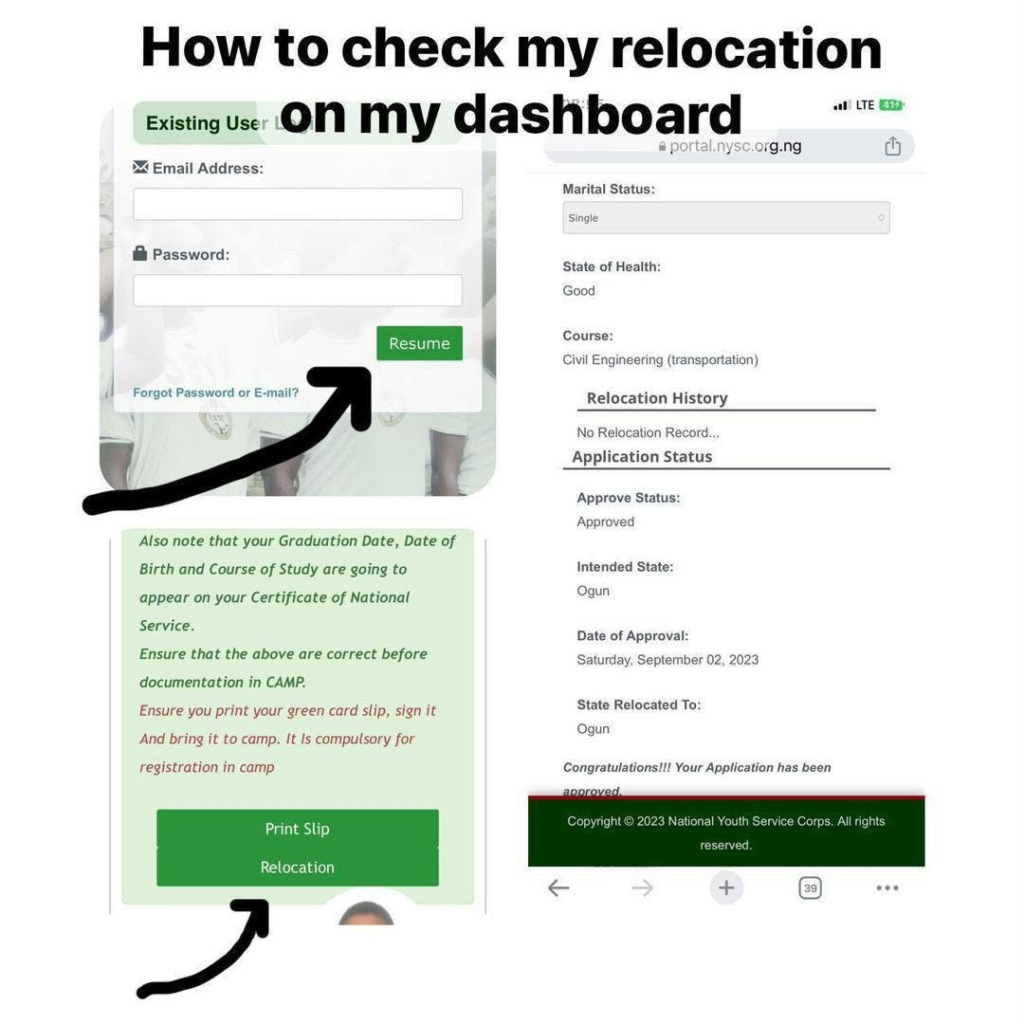
The exact layout may vary depending on the dashboard version available to your account.
Meaning of NYSC Relocation Status
1. Relocation Approved
If your dashboard indicates that your application has been approved, follow the instructions provided by NYSC. Check whether your relocation letter is available for printing and whether any payment or additional steps are required.
2. Relocation Pending
A pending status generally means that a final decision has not yet been reflected on your dashboard. It does not automatically mean your application has been rejected.
Check your dashboard again later and follow official instructions if additional information or documentation is requested.
3. Relocation Status Not Showing
If you cannot find the relocation option or your application status is not displayed, confirm that you are using the correct account and dashboard. You can also try refreshing the page or signing in again.
If the issue continues, contact NYSC through its official website or support channels.
How to Print NYSC Relocation Letter After Approval
If your relocation application has been approved and the printing option is available, follow these general steps:
- Log in to your NYSC dashboard.
- Locate the relocation letter or payment and printing option.
- Read the instructions displayed on the portal.
- Confirm your details and any applicable fee.
- Complete payment only if the official portal requires it.
- Return to the dashboard and follow the instructions to print or download your relocation letter.
The precise wording of the buttons and the steps may change as the NYSC portal is updated. Follow the instructions currently displayed on your account.
How Much Does NYSC Relocation Letter Printing Cost?
Some online guides have quoted a fee of approximately ₦1,176, comprising ₦1,000 and ₦176 in Remita charges. However, this amount should not be treated as a confirmed current fee for every applicant.
Before making payment, verify the amount displayed on the official NYSC portal. Do not transfer money to personal bank accounts or pay unofficial agents to approve your relocation.
What to Do After Printing Your NYSC Relocation Letter
After obtaining your relocation letter:
- Read the letter carefully and confirm the state or location stated on it.
- Follow the reporting instructions provided by NYSC.
- Contact the relevant NYSC state secretariat if you need clarification about reporting or documentation.
- Keep a digital copy and a printed copy of the letter.
- Continue checking your dashboard for any additional instructions.
Do not travel or make major arrangements based solely on an unverified message. Confirm your approved posting and reporting requirements through official channels.
Important Information About NYSC Relocation
According to the NYSC’s official Corps Mobilization Department, relocation applications are processed electronically, and the scheme has procedures for relocation during and after the orientation course. The official process and eligibility requirements should be followed when applying or checking an application.
Official reference: NYSC Corps Mobilization Department.